Workspace Apps

Your localization agent in Teams

Straker Translate for Microsoft Teams elevates global business productivity by integrating AI-driven translation management directly into your workflow. Your global team can now chat in any language, set up AI translation quality scores for your content, and easily decide when Human Verification is needed -- all without ever leaving Microsoft Teams.


Connect Microsoft Teams to Verify

Straker Translate for Microsoft Teams elevates global business productivity by integrating AI-driven translation management directly into your workflow. Your global team can now chat in any language, set up AI translation quality scores for your content, and easily decide when Human Verification is needed -- all without ever leaving Microsoft Teams.

On-demand
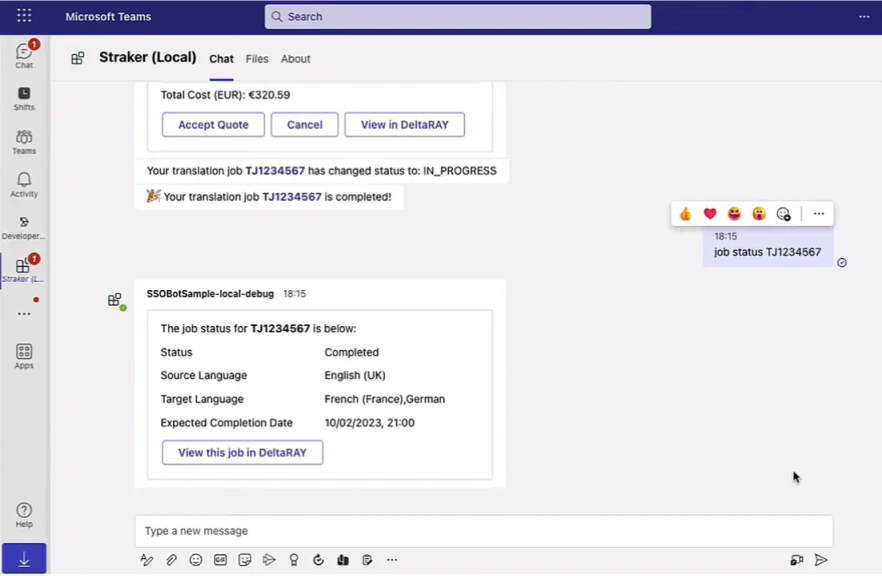
job status

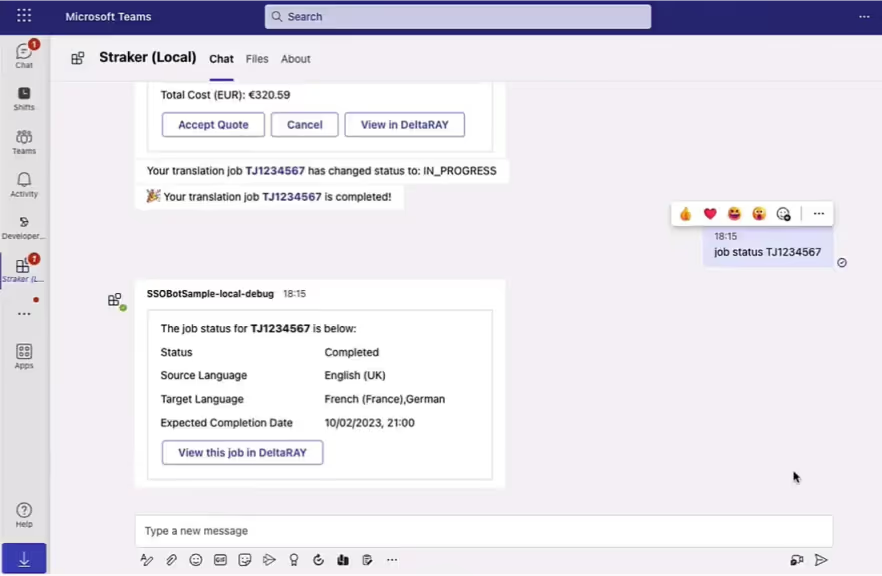
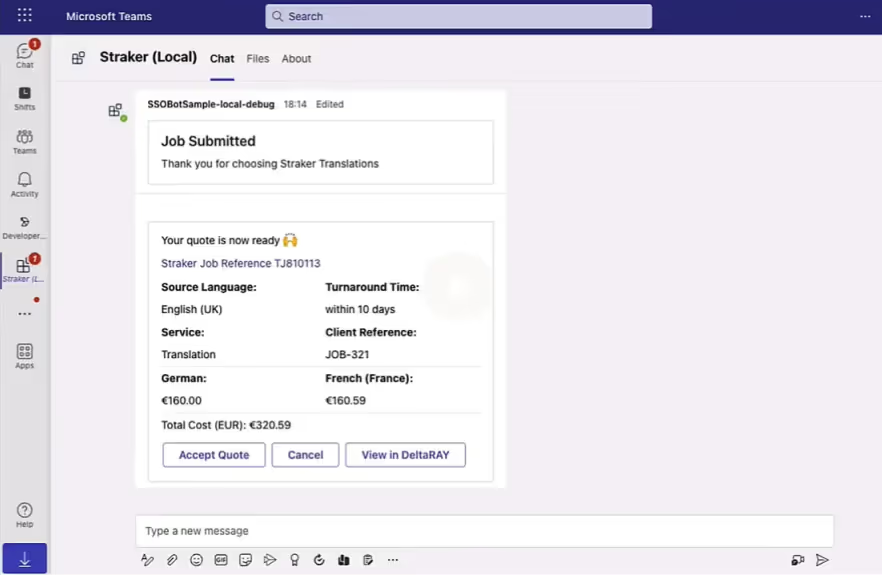
Use the Straker Teams translation app to verify the status of the jobs you submitted by simply typing in the TJ number in the Straker channel. Quickly determine which jobs are on time or at risk to help you proactively manage your translation projects.

View
job risks

Remain in control of your translation jobs with the simple ray my jobs prompt in the Straker tab of your MS Teams workspace to verify your submitted jobs. These will be listed and categorized by “In Progress, In Validation, Pending Quotes and Completed” so you can quickly detect job risks.

Project
transparency

Conveniently manage your translation jobs and never miss a project deadline using the Straker app in Teams. Your translation projects are at your fingertips, with regular notifications delivered directly to your workspace to give you complete visibility of your translation costs and job statuses.

Streamline workflow

Smash your translation project management goals by submitting new translation requests, accepting quotes, receiving translated files, and tracking the status of all your projects without leaving the app. Trust Straker’ app assistant to help you with many of your translation needs immediately.

Improve your productivity

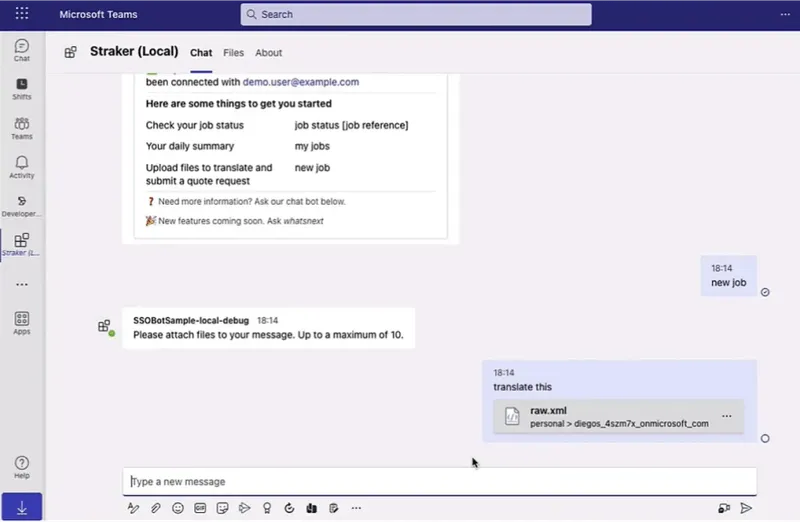
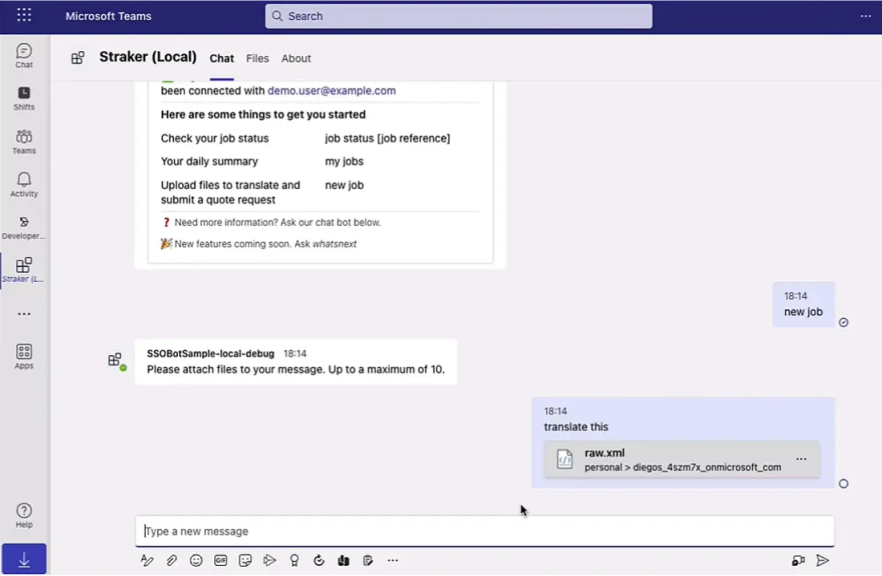
Submit new translation jobs by dropping and dragging your files, filling in the four required fields, and receiving and accepting the quote for the project, all within MS Teams. We support diverse file formats, including. Resx, XML, Doc, Docx, PPT, XLS, RTF, ODT, HTML, and PSD.

Get your completed files easily

Move faster and save valuable time with Straker’s app notifications that let you know once your translation files are completed and ready to download. Efficiently collaborate, have discussions, and make decisions in the same workspace to finalize your project and increase speed to market delivery.

Wide File Format Support

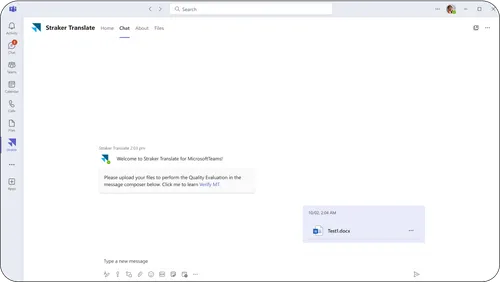
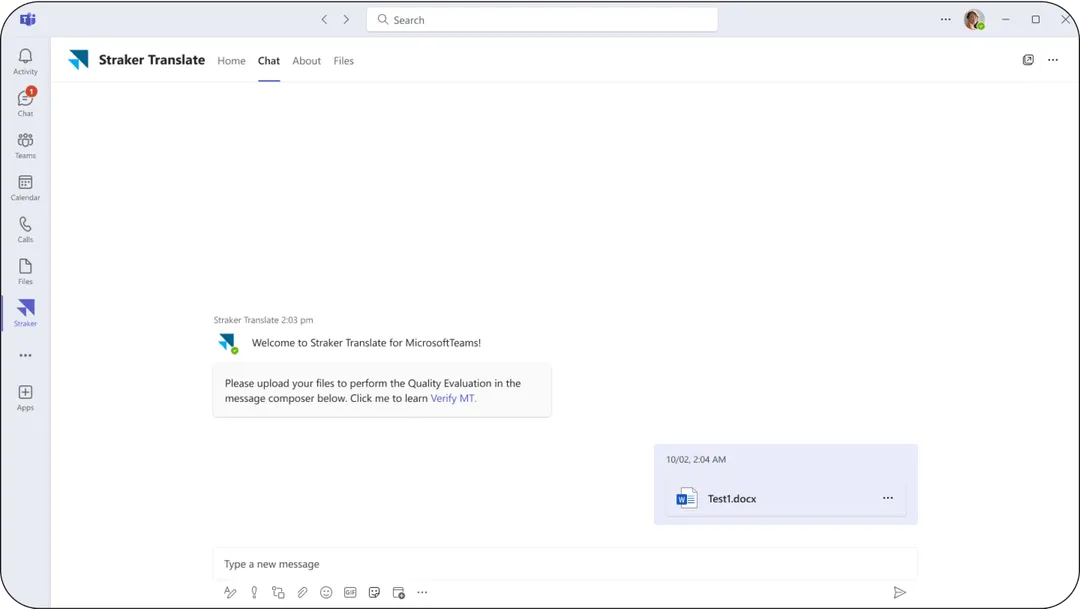
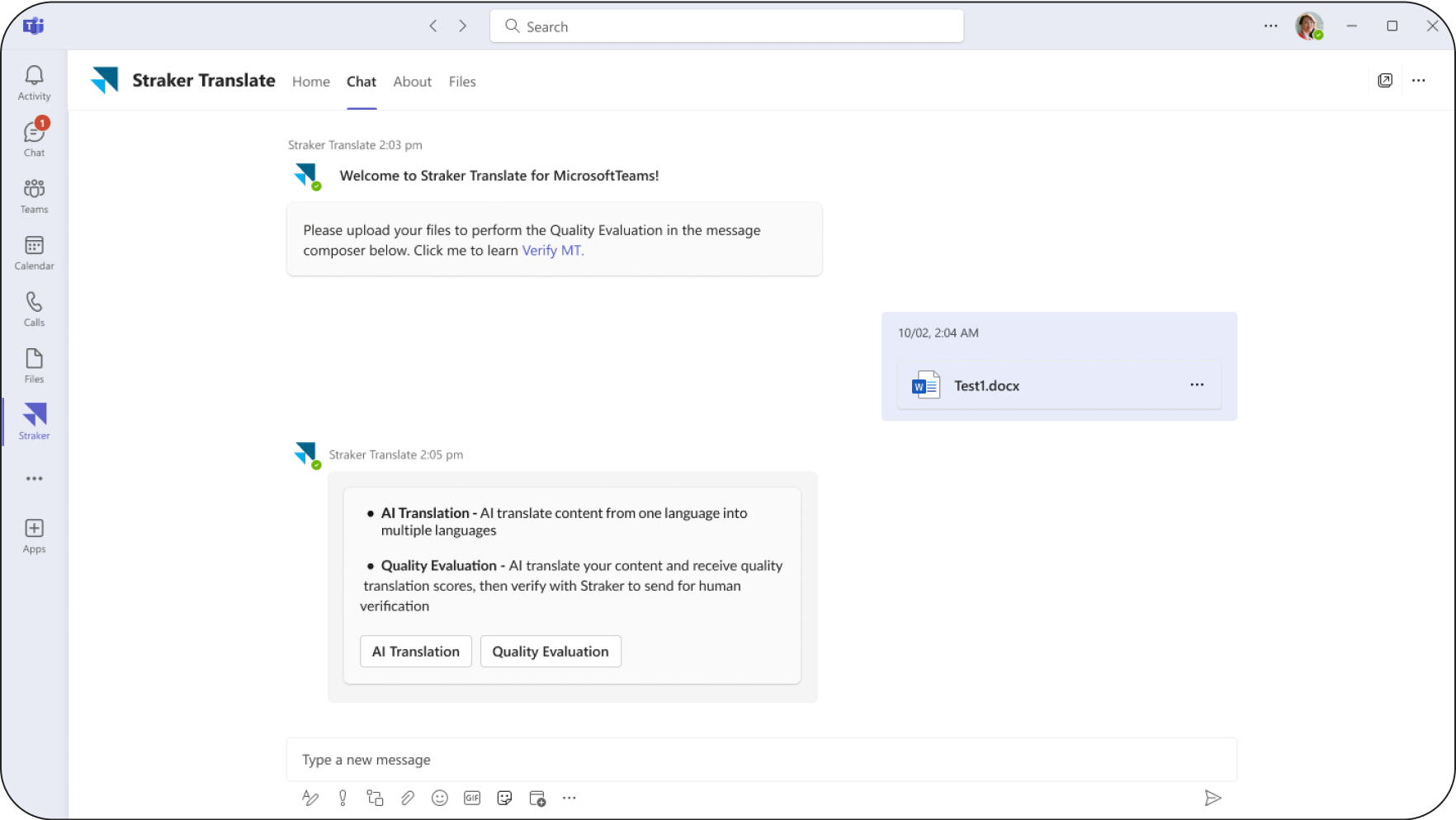
Submit new translation jobs with ease by simply dragging and dropping your files—all within Microsoft Teams. We support a variety of file types, including: ai, doc, docx, gif, htm, html, jpg, json, odp, ods, odt, pdf, png, ppt, pptx, psd, resx, rtf, txt, xliff, xls, xlsx, xml.

Screenshot of Straker Translate in Microsoft Teams showing file upload, illustrating wide file format support for multilingual translation.

Integrated AI Tools for Better Productivity

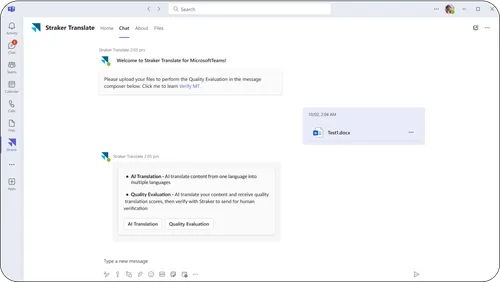
Connecting Verify to your Straker Translate for Microsoft Teams account opens up easy access to advanced AI tools, such as AI Translate and Quality Evaluation, making your team more efficient and aligned.

Screenshot of Straker Translate in Microsoft Teams showing AI Translation and Quality Evaluation tools that boost multilingual productivity.

Tailored Project Setup

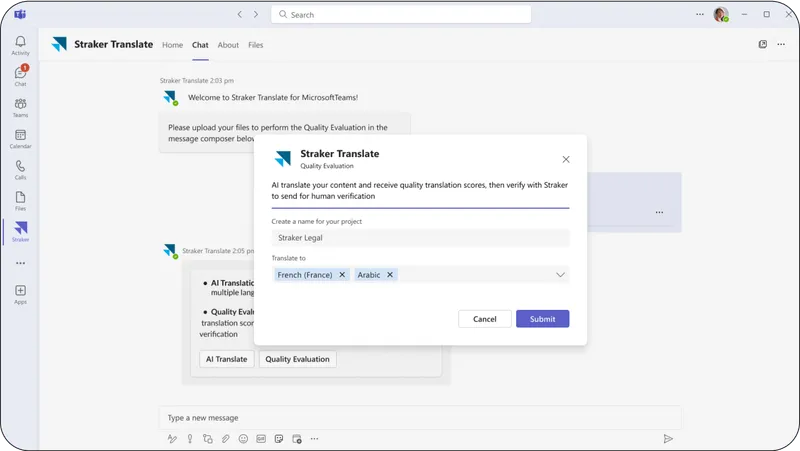
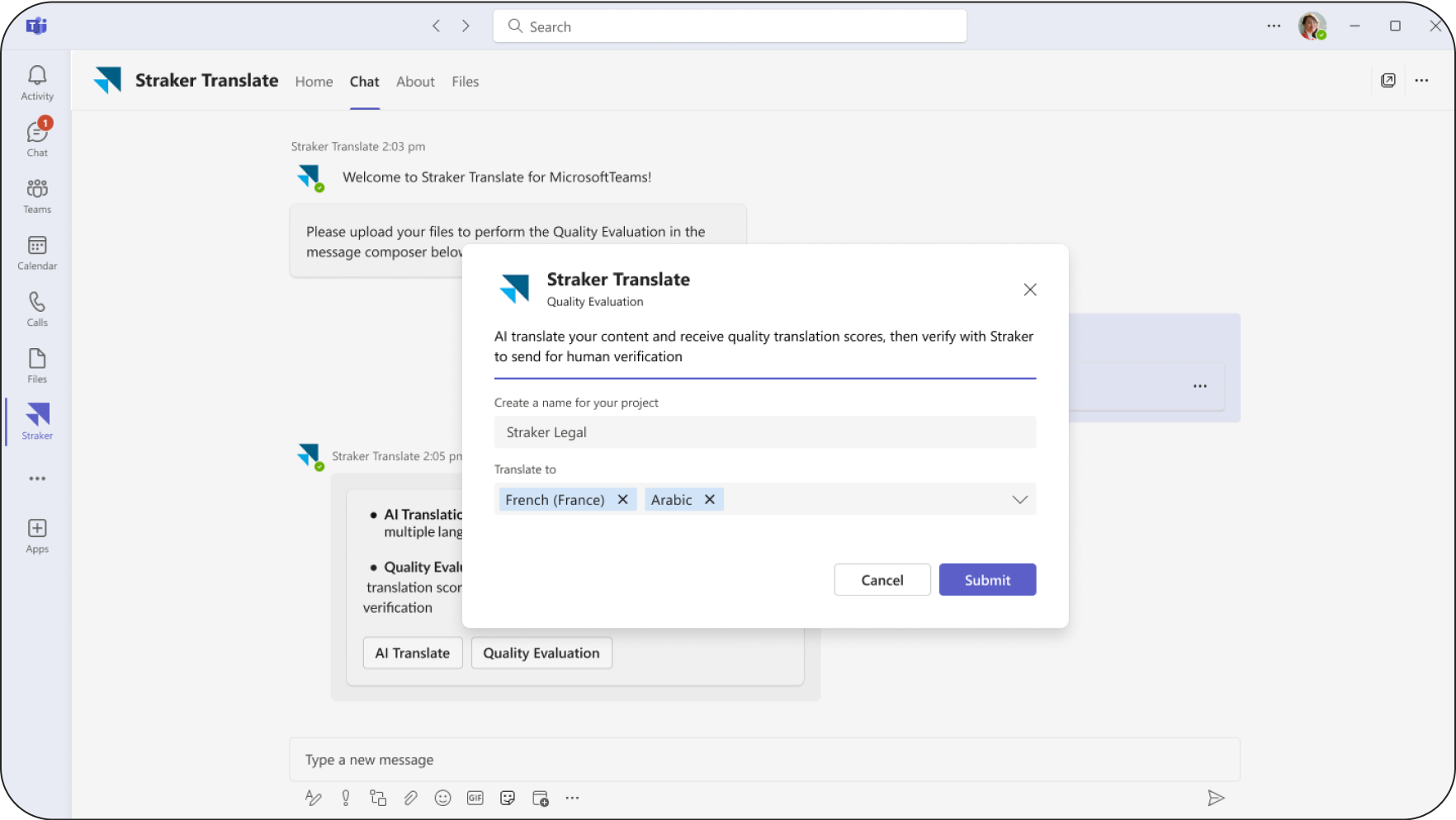
Easily customize your projects by naming them and selecting the language of choice. Now it's more effortless to jump straight into your work with minimal setup time.

Screenshot of Straker Translate in Microsoft Teams showing AI Translation and Quality Evaluation tools that boost multilingual productivity.

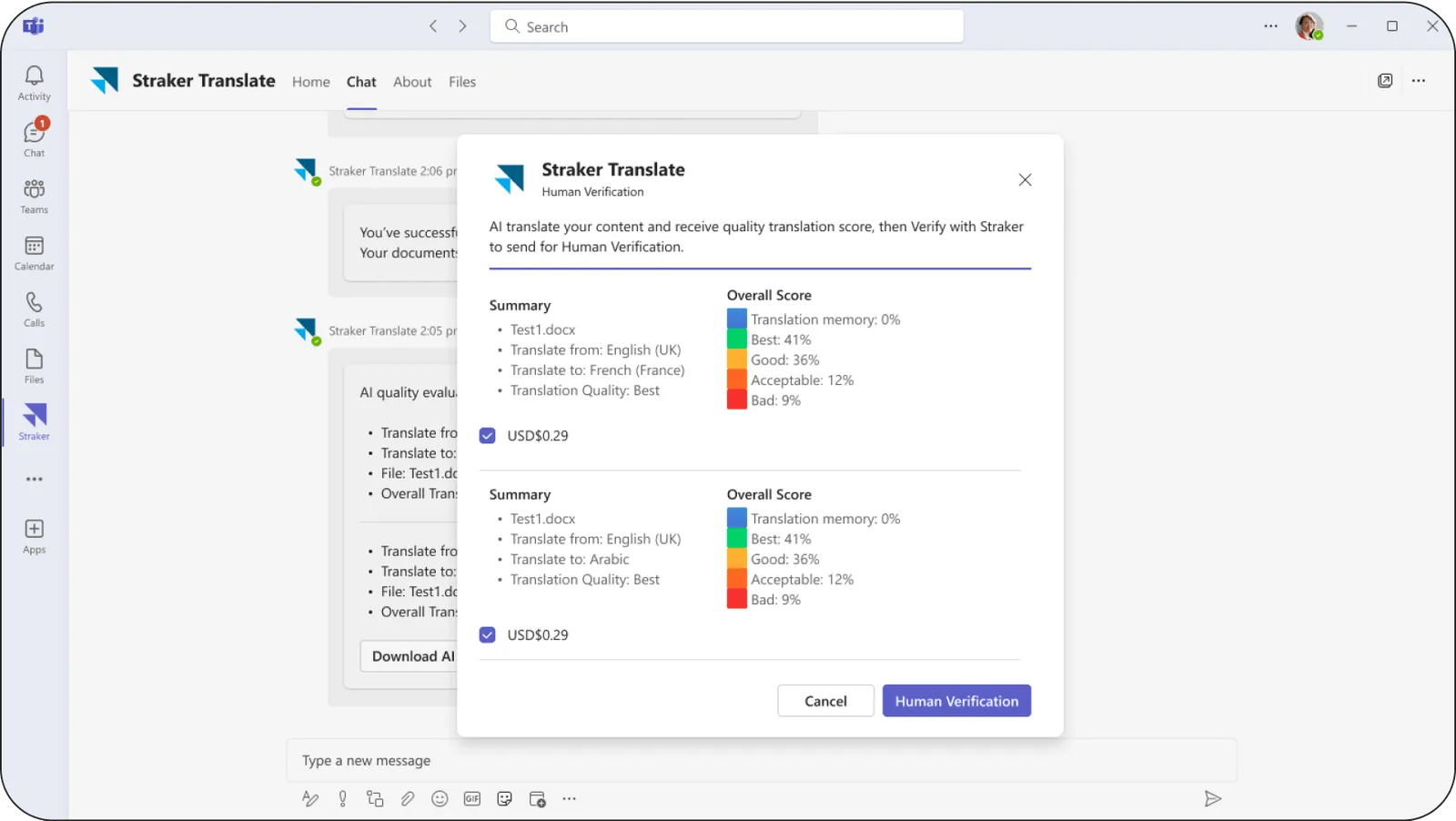
Take Control with Quality Scores and Human Verification

Easily review detailed quality scores for your translations and decide if Human Verification is needed.

Screenshot of Straker Translate in Microsoft Teams showing a project setup modal to name jobs and choose target languages instantly.

Ready to verify in Teams

Install the app now and start verifying AI content instantly. No setup required.

どこからでも
翻訳を管理

LanguageCloud Teams アプリを​使用して、​Microsoft Teams 内で​シームレスな​翻訳体験を​お楽しみください。​アプリを​離れる​ことなく、​AIを​活用してより​ダイナミックな​ワークフローを​構築し、​作業プロセスを​スピードアップします。
Smiling man receiving a Straker Translate notification in Microsoft Teams.

Microsoft TeamsにVerifyを連携

Microsoft Teamsで​使用できる​Strakerアプリは、​AIを​活用した​翻訳管理を、​ワークフローの​中に​直接取り​入れる​ことで、​ビジネスの​グローバル化に​伴い​必要と​される​生産性の​向上を​実現させます。​グローバルチームで​働く​スタッフは、​Microsoft Teamsを​使用したまま​その​環境から​離れる​ことなく、​あらゆる​言語で​チャットメッセージの​やりとりが​でき、​また、​翻訳したい​ファイルの​AI翻訳を​実行して​その​翻訳の​品質評価の​スコアリング結果を​入手できるので、​その後、​人間に​よる​検証が​必要か​どうか​判断しやすくなります。

On-demand
job status

Use the Straker Teams translation app to verify the status of the jobs you submitted by simply typing in the TJ number in the Straker channel. Quickly determine which jobs are on time or at risk to help you proactively manage your translation projects.

View
job risks

Remain in control of your translation jobs with the simple ray my jobs prompt in the Straker tab of your MS Teams workspace to verify your submitted jobs. These will be listed and categorized by “In Progress, In Validation, Pending Quotes and Completed” so you can quickly detect job risks.

Project
transparency

Conveniently manage your translation jobs and never miss a project deadline using the Straker app in Teams. Your translation projects are at your fingertips, with regular notifications delivered directly to your workspace to give you complete visibility of your translation costs and job statuses.

Streamline workflow

Smash your translation project management goals by submitting new translation requests, accepting quotes, receiving translated files, and tracking the status of all your projects without leaving the app. Trust Straker’ app assistant to help you with many of your translation needs immediately.

Improve your productivity

Submit new translation jobs by dropping and dragging your files, filling in the four required fields, and receiving and accepting the quote for the project, all within MS Teams. We support diverse file formats, including. Resx, XML, Doc, Docx, PPT, XLS, RTF, ODT, HTML, and PSD.

Get your completed files easily

Move faster and save valuable time with Straker’s app notifications that let you know once your translation files are completed and ready to download. Efficiently collaborate, have discussions, and make decisions in the same workspace to finalize your project and increase speed to market delivery.

幅​広いファイル形式に​対応

Microsoft Teams内で​ファイルを​ドラッグ&ドロップするだけの​簡単な​操作で​新規翻訳案件を​依頼できます。​ai、​doc、​docx、​gif、​htm、​html、​jpg、​json、​odp、​ods、​odt、​pdf、​png、​ppt、​pptx、​psd、​resx、​rtf、​txt、​xliff、​xls、​xlsx、​xmlなど、​さまざまな​ファイル形式に​対応しています。

生産性向上を​実現する​統合型AIツール

Microsoft Teamsの​アカウントで​利用できる​Strakerアプリに​Verifyを​連携させる​ことで、​AI翻訳や​品質評価などの​高度な​AIツールに​簡単に​アクセスできるようになり、​社内チームの​作業の​効率性アップや​チームの​一体​感を​実現できます。

プロジェクトの​設定を​カスタマイズ

プロジェクトに​名前を​つけて、​ご希望の​言語を​選択する​ことで、​プロジェクトの​カスタマイズも​簡単に​できます。​最小限の​設定を​行うだけで​いいので、​時間も​かからず、​すぐに​自分の​仕事に​取りかかる​ことができます。

AIに​よる​翻訳品質評価および​人間に​よる​検証の​有無を​管理

お客様の​ファイルを​AI翻訳し、​その​翻訳に​対して​詳細な​品質評価の​スコア付けを​行うので、​その​結果に​応じて​その後、​人間に​よる​検証が​必要か​どうかを​決める​ことができます。

Gestiona tus traducciones
estés donde estés

Utiliza la aplicación de LanguageCloud para Teams y disfruta de una experiencia de traducción sin contratiempos dentro de Microsoft Teams. Aprovecha la IA para crear flujos de trabajo más dinámicos y acelerar los procesos sin necesidad de salir de la aplicación.
Características

Conectar Microsoft Teams con Verify

La app de Straker para Microsoft Teams impulsa la productividad general de tu negocio integrando la gestión de traducciones asistida por IA directamente en tu flujo de trabajo. Ahora, tu equipo puede chatear en cualquier idioma, configurar valoraciones de calidad para las traducciones de contenido realizadas con IA y decidir fácilmente cuándo es necesario un paso de verificación adicional, todo ello sin salir de Microsoft Teams.

Estado de proyectos a demanda

Utiliza la aplicación de traducción de Straker para Teams para comprobar el estado de los trabajos enviados con solo escribir el número TJ en el canal de Straker. Comprueba rápidamente qué trabajos están dentro de plazo y cuáles van con retraso para administrar de forma proactiva tus proyectos de traducción.

Consulta los proyectos en riesgo

Mantén tus trabajos de traducción bajo control con el simple mensaje "Ray My Jobs" en la pestaña Straker de tu espacio de trabajo de MS Teams para verificar los trabajos enviados. Se mostrará una lista con los trabajos categorizados según estén "En progreso", "En validación", con "Presupuesto pendiente" o "Completados" para que puedas detectar rápidamente los posibles proyectos en riesgo.

Máxima transparencia

Administra cómodamente tus trabajos de traducción y no dejes pasar ni un plazo de entrega utilizando la aplicación de Straker en Teams. Tus proyectos de traducción siempre estarán a tu alcance, con notificaciones periódicas enviadas directamente a tu espacio de trabajo para ofrecerte una visibilidad completa de sus costes de traducción y los estados de los trabajos.

Simplifica el flujo de trabajo

Alcanza tus objetivos enviando nuevas solicitudes de traducción, aceptando presupuestos, recibiendo archivos traducidos y realizando un seguimiento del estado de todos tus proyectos desde una misma aplicación. Confía en el asistente de la app de Straker para obtener ayuda de forma inmediata en todo lo relativo a tus traducciones.

Impulsa tu productividad

Solicita una nueva traducción soltando y arrastrando los archivos, cumplimenta los cuatro campos obligatorios y recibe y acepta el presupuesto del proyecto, todo ello sin salir de MS Teams. Es compatible con diferentes formatos de archivos, incluyendo: Resx, XML, Doc, Docx, PPT, XLS, RTF, ODT, HTML y PSD.

Recibe los archivos traducidos fácilmente

No pierdas ni un solo segundo gracias a las notificaciones de la aplicación de Straker, que te avisan una vez que tus archivos traducidos están completos y listos para descargar. Colabora de manera eficiente, dialoga y toma decisiones en el mismo espacio de trabajo para finalizar su proyecto y adelantar su lanzamiento.

Compatible con gran variedad de formatos

Envía nuevos trabajos de traducción fácilmente con solo arrastrar y soltar los archivos desde Microsoft Teams. Funciona con multitud de formatos de archivo, entre otros, ai, doc, docx, gif, htm, html, jpg, json, odp, ods, odt, pdf, png, ppt, pptx, psd, resx, rtf, txt, xliff, xls, xlsx, y xml.

Herramientas de IA integradas para mejorar la productividad

Al conectar Verify a tu cuenta de la app de Straker para Microsoft Teams podrás acceder a herramientas avanzadas, como las traducciones y evaluaciones de calidad con IA, lo que permitirá que tu equipo trabaje de forma más eficiente y coordinada.

Configuración de proyectos personalizada

Configura fácilmente tus proyectos asignándoles un nombre y seleccionando el idioma. De esta forma, podrás ponerte a trabajar directamente sin tener que invertir mucho tiempo en los ajustes del proyecto.

Toma el control con las evaluaciones de calidad y la verificación con expertos

Revisa fácilmente las puntuaciones de calidad detalladas de tus traducciones y decide si es necesario que un lingüista las revise.